# One-deploy multiple nfs datastore backends

**URL:** https://forum.opennebula.io/t/one-deploy-multiple-nfs-datastore-backends/13995
**Category:** Hosted Clouds
**Created:** [July 16, 2025, 5:10pm UTC](https://forum.opennebula.io/t/one-deploy-multiple-nfs-datastore-backends/13995 "2025-07-16T17:10:10Z")
**Posts on this page:** 6
**Page:** 1

<div class="post-metadata">

### Author: ![dseira](https://yyz1.discourse-cdn.com/flex031/user_avatar/forum.opennebula.io/dseira/32/8636_2.png) [@dseira](https://forum.opennebula.io/u/dseira)
#### Post date: [July 16, 2025, 5:10pm UTC](https://forum.opennebula.io/t/one-deploy-multiple-nfs-datastore-backends/13995/1 "2025-07-16T17:10:10Z")

</div>

Hi,

I would like to achieve the following setup with one-deploy; for hybrid multicloud environments where there can be VMs with different disk perfomances, we usually create differents nfs volumes (for ex):

```auto
1.1.1.1:/datastore1/nfs --> SSD disks based
2.2.2.2:/datastore2/nfs --> SATA disks based

```

The main goal is to be able to create 2 different datastores where to store the disks of the VMs.

I can figure out that this has to be done with the generic datastore mode:

> **[arch\_generic\_ds](https://github.com/OpenNebula/one-deploy/wiki/arch_generic_ds)**
>
> Contribute to OpenNebula/one-deploy development by creating an account on GitHub.

I’ve tried something like this with one-deploy (just `ds` section):

```yaml
    ds:
      mode: generic
      config:
        IMAGE_DS:
          default:
            enabled: false
          datastore1:
            id: 100
            managed: true
            enabled: true
            symlink:
              groups: [frontend, node]
              src: /mnt/datastore1/100/
            template:
              TYPE: IMAGE_DS
              TM_MAD: shared
          datastore2:
            id: 101
            managed: true
            enabled: true
            symlink:
              groups: [frontend, node]
              src: /mnt/datastore2/101/
            template:
              TYPE: IMAGE_DS
              TM_MAD: shared
        FILE_DS:
          files:
            id: 2
            managed: true
            symlink:
              groups: [node]
              src: /mnt/datastore1/2/
            template:
              TYPE: FILE_DS
              TM_MAD: shared
    fstab:
      - src: "1.1.1.1:/datastore1/nfs"
        path: /mnt/datastore1
        fstype: nfs
        opts: rw,nfsvers=3
      - src: "2.2.2.2:/datastore2/nfs"
        path: /mnt/datastore2
        fstype: nfs
        opts: rw,nfsvers=3

```

But the above one-deploy code fails (`Provision Datastores task`):

```bash
TASK [opennebula.deploy.datastore/generic : Ensure /var/lib/one/datastores/ exists] ************************************************************************************************************************************************************
ok: [n1] => changed=false 
  gid: 9869
  group: oneadmin
  mode: '0750'
  owner: oneadmin
  path: /var/lib/one/datastores/
  size: 4096
  state: directory
  uid: 9869
ok: [n2] => changed=false 
  gid: 9869
  group: oneadmin
  mode: '0750'
  owner: oneadmin
  path: /var/lib/one/datastores/
  size: 4096
  state: directory
  uid: 9869

TASK [opennebula.deploy.datastore/generic : Setup datastore symlinks] **************************************************************************************************************************************************************************
skipping: [n1] => (item=system) => changed=false 
  ansible_loop_var: item
  false_condition: _mount_path != '/var/lib/one/datastores'
  item: system
  skip_reason: Conditional result was False
skipping: [n1] => (item=default) => changed=false 
  ansible_loop_var: item
  false_condition: _mount_path != '/var/lib/one/datastores'
  item: default
  skip_reason: Conditional result was False
skipping: [n2] => (item=system) => changed=false 
  ansible_loop_var: item
  false_condition: _mount_path != '/var/lib/one/datastores'
  item: system
  skip_reason: Conditional result was False
skipping: [n2] => (item=default) => changed=false 
  ansible_loop_var: item
  false_condition: _mount_path != '/var/lib/one/datastores'
  item: default
  skip_reason: Conditional result was False
failed: [n1] (item=datastore1) => changed=false 
  ansible_loop_var: item
  cmd: |-
    set -o errexit
  
    if [[-L '/var/lib/one/datastores/100']]; then exit 0; fi
  
    if ! [[-d '/mnt/datastore1/100']]; then
      echo "Symlink target does not exist or is not a directory." >&2
      exit 1
    fi
  
    if [[-d '/var/lib/one/datastores/100']] && ! rmdir '/var/lib/one/datastores/100'; then exit 1; fi
  
    if ! ln -s '/mnt/datastore1/100' '/var/lib/one/datastores/100'; then exit 1; fi
  
    exit 78
  delta: '0:00:00.003682'
  end: '2025-07-16 16:23:47.857337'
  failed_when_result: true
  item: datastore1
  msg: non-zero return code
  rc: 1
  start: '2025-07-16 16:23:47.853655'
  stderr: Symlink target does not exist or is not a directory.
  stderr_lines: <omitted>
  stdout: ''
  stdout_lines: <omitted>
failed: [n2] (item=datastore1) => changed=false 
  ansible_loop_var: item
  cmd: |-
    set -o errexit
  
    if [[-L '/var/lib/one/datastores/100']]; then exit 0; fi
  
    if ! [[-d '/mnt/datastore1/100']]; then
      echo "Symlink target does not exist or is not a directory." >&2
      exit 1
    fi
  
    if [[-d '/var/lib/one/datastores/100']] && ! rmdir '/var/lib/one/datastores/100'; then exit 1; fi
  
    if ! ln -s '/mnt/datastore1/100' '/var/lib/one/datastores/100'; then exit 1; fi
  
    exit 78
  delta: '0:00:00.004643'
  end: '2025-07-16 16:23:47.916261'
  failed_when_result: true
  item: datastore1
  msg: non-zero return code
  rc: 1
  start: '2025-07-16 16:23:47.911618'
  stderr: Symlink target does not exist or is not a directory.
  stderr_lines: <omitted>
  stdout: ''
  stdout_lines: <omitted>
failed: [n1] (item=datastore2) => changed=false 
  ansible_loop_var: item
  cmd: |-
    set -o errexit
  
    if [[-L '/var/lib/one/datastores/101']]; then exit 0; fi
  
    if ! [[-d '/mnt/datastore2/101']]; then
      echo "Symlink target does not exist or is not a directory." >&2
      exit 1
    fi
  
    if [[-d '/var/lib/one/datastores/101']] && ! rmdir '/var/lib/one/datastores/101'; then exit 1; fi
  
    if ! ln -s '/mnt/datastore2/101' '/var/lib/one/datastores/101'; then exit 1; fi
  
    exit 78
  delta: '0:00:00.003850'
  end: '2025-07-16 16:23:48.046909'
  failed_when_result: true
  item: datastore2
  msg: non-zero return code
  rc: 1
  start: '2025-07-16 16:23:48.043059'
  stderr: Symlink target does not exist or is not a directory.
  stderr_lines: <omitted>
  stdout: ''
  stdout_lines: <omitted>
failed: [n2] (item=datastore2) => changed=false 
  ansible_loop_var: item
  cmd: |-
    set -o errexit
  
    if [[-L '/var/lib/one/datastores/101']]; then exit 0; fi
  
    if ! [[-d '/mnt/datastore2/101']]; then
      echo "Symlink target does not exist or is not a directory." >&2
      exit 1
    fi
  
    if [[-d '/var/lib/one/datastores/101']] && ! rmdir '/var/lib/one/datastores/101'; then exit 1; fi
  
    if ! ln -s '/mnt/datastore2/101' '/var/lib/one/datastores/101'; then exit 1; fi
  
    exit 78
  delta: '0:00:00.004549'
  end: '2025-07-16 16:23:48.154299'
  failed_when_result: true
  item: datastore2
  msg: non-zero return code
  rc: 1
  start: '2025-07-16 16:23:48.149750'
  stderr: Symlink target does not exist or is not a directory.
  stderr_lines: <omitted>
  stdout: ''
  stdout_lines: <omitted>
ok: [n1] => (item=files) => changed=false 
  ansible_loop_var: item
  cmd: |-
    set -o errexit
  
    if [[-L '/var/lib/one/datastores/2']]; then exit 0; fi
  
    if ! [[-d '/mnt/datastore1/2']]; then
      echo "Symlink target does not exist or is not a directory." >&2
      exit 1
    fi
  
    if [[-d '/var/lib/one/datastores/2']] && ! rmdir '/var/lib/one/datastores/2'; then exit 1; fi
  
    if ! ln -s '/mnt/datastore1/2' '/var/lib/one/datastores/2'; then exit 1; fi
  
    exit 78
  delta: '0:00:00.003522'
  end: '2025-07-16 16:23:48.245525'
  failed_when_result: false
  item: files
  msg: ''
  rc: 0
  start: '2025-07-16 16:23:48.242003'
  stderr: ''
  stderr_lines: <omitted>
  stdout: ''
  stdout_lines: <omitted>
ok: [n2] => (item=files) => changed=false 
  ansible_loop_var: item
  cmd: |-
    set -o errexit
  
    if [[-L '/var/lib/one/datastores/2']]; then exit 0; fi
  
    if ! [[-d '/mnt/datastore1/2']]; then
      echo "Symlink target does not exist or is not a directory." >&2
      exit 1
    fi
  
    if [[-d '/var/lib/one/datastores/2']] && ! rmdir '/var/lib/one/datastores/2'; then exit 1; fi
  
    if ! ln -s '/mnt/datastore1/2' '/var/lib/one/datastores/2'; then exit 1; fi
  
    exit 78
  delta: '0:00:00.004123'
  end: '2025-07-16 16:23:48.384477'
  failed_when_result: false
  item: files
  msg: ''
  rc: 0
  start: '2025-07-16 16:23:48.380354'
  stderr: ''
  stderr_lines: <omitted>
  stdout: ''
  stdout_lines: <omitted>

```

In the Host Nodes, you can see both datastores mounted correctly:

```auto
1.1.1.1:/datastore1/nfs 187G 0 187G 0% /mnt/datastore1
2.2.2.2:/datastore2/nfs 187G 0 187G 0% /mnt/datastore2

```

In fact, in you see in the `/var/lib/one/datatores/` folder, you can see this:

```bash
root@host1:~# ls -lh /var/lib/one/datastores/
total 0
lrwxrwxrwx 1 root root 33 Jul 16 15:42 2 -> /mnt/datastore1/2

```

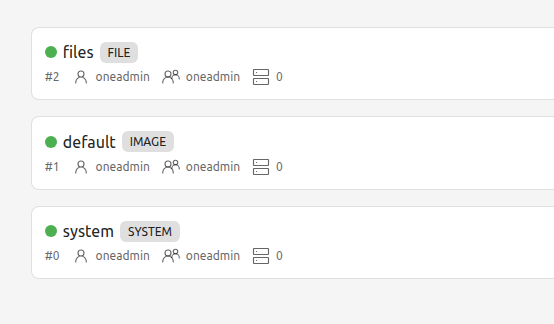
And if you see in the OpenNebula UI you can see just the three default:
 ![image](https://canada1.discourse-cdn.com/flex031/uploads/opennebula/original/2X/b/b0a20d96192c497b8f580602fb2d9521eabc2325.png)

How can we have multiple nfs datastores and multiple IMAGES datastores?

---

<div class="post-metadata">

### Author: ![mopala](https://yyz1.discourse-cdn.com/flex031/user_avatar/forum.opennebula.io/mopala/32/7229_2.png) [@mopala](https://forum.opennebula.io/u/mopala)
#### Post date: [July 17, 2025, 10:54am UTC](https://forum.opennebula.io/t/one-deploy-multiple-nfs-datastore-backends/13995/2 "2025-07-17T10:54:40Z")

</div>

Hi @dseira,

Could you confirm directories /mnt/datastore1/100/ and /mnt/datastore2/101/ exist in your NFS share? If not could you create them, then try again? I mean the error message is very specific:

```auto
    if ! [[-d '/mnt/datastore1/100']]; then
      echo "Symlink target does not exist or is not a directory." >&2
      exit 1
    fi

```

🤔

---

<div class="post-metadata">

### Author: ![dseira](https://yyz1.discourse-cdn.com/flex031/user_avatar/forum.opennebula.io/dseira/32/8636_2.png) [@dseira](https://forum.opennebula.io/u/dseira)
#### Post date: [July 17, 2025, 1:39pm UTC](https://forum.opennebula.io/t/one-deploy-multiple-nfs-datastore-backends/13995/3 "2025-07-17T13:39:18Z")

</div>

Those folders don’t exist.

If I create them manually the one-deploy continues.

I would expect one-deploy to create them (as it is done for the default datastores 1 and 2; I didn’t do anything with those):

```bash
# ls -lh /mnt/datastore1/
drwxr-xr-x 2 oneadmin oneadmin 4.0K Jul 17 11:16 1
drwxr-xr-x 2 oneadmin oneadmin 4.0K Jul 17 11:16 2

```

To get the one-deploy deploy without any error I also had to remove the disablement of the `default` IMAGE\_DS:

```yaml
          default:
            enabled: false

```

And add this in the `datastore1` and `datastore2` template section:

```yaml
DS_MAD: fs

```

Now it seems that the datastores are added correctly (one-deploy finish without any error) but there is something strange in the size of those datastores. Look:

```bash
  ID NAME SIZE AVA CLUSTERS IMAGES TYPE DS TM STAT
 101 datastore1 8G 15% 0 0 img fs shared on  
 100 datastore2 8G 15% 0 0 img fs shared on  
   2 files 8G 15% 0 0 fil fs shared on  
   1 default 8G 15% 0 0 img fs ssh on  
   0 system - - 0 0 sys - ssh on 

```

It is the same size as the default datastore, it not the real size of the NFS volumes:

```bash
1.1.1.1:/datastore1/nfs 187G 0 187G 0% /mnt/datastore1
2.2.2.2:/datastore2/nfs 187G 0 187G 0% /mnt/datastore2

```

But the symlinks seems ok:

```bash
# ls -lh /var/lib/one//datastores/100
lrwxrwxrwx 1 root root 35 Jul 17 11:24 /var/lib/one//datastores/100 -> /mnt/datastore1/100

# ls -lh /var/lib/one//datastores/101
lrwxrwxrwx 1 root root 36 Jul 17 11:24 /var/lib/one//datastores/101 -> /mnt/datastore2/101

```

---

<div class="post-metadata">

### Author: ![mopala](https://yyz1.discourse-cdn.com/flex031/user_avatar/forum.opennebula.io/mopala/32/7229_2.png) [@mopala](https://forum.opennebula.io/u/mopala)
#### Post date: [July 17, 2025, 5:58pm UTC](https://forum.opennebula.io/t/one-deploy-multiple-nfs-datastore-backends/13995/4 "2025-07-17T17:58:13Z")

</div>

> I would expect one-deploy to create them (as it is done for the default datastores 1 and 2; I didn’t do anything with those):

OpenNebula datastore drivers create directories in `/var/lib/one/datastores/` automatically. The only way I see that `/mnt/datastore1/1/` and `/mnt/datastore1/2/` were auto-created is because somehow `/mnt/datastore1/` is mounted in `/var/lib/one/datastores/` (or was mounted there previously).

> To get the one-deploy deploy without any error I also had to remove the disablement of the `default` IMAGE\_DS:

In OpenNebula only “system” datastores can be enabled or disabled.

> And add this in the `datastore1` and `datastore2` template section: DS\_MAD: fs

Yes, it seems you copied an example for multiple SYSTEM\_DS datastores and assumed IMAGE\_DS datastores are configured the same way, but that’s incorrect assumption.

> 101 datastore1 8G 15% 0 0 img fs shared on  
> 100 datastore2 8G 15% 0 0 img fs shared on

I don’t see clear explanation for this, maybe you need to wait for another monitoring cycle to see the update?

I think it would be much better your ds config would look like this:

```yaml
    ds:
      mode: generic
      config:
        IMAGE_DS:
          datastore1:
            id: 100
            managed: true
            symlink:
              groups: [frontend, node]
              src: /mnt/datastore1/
            template:
              TYPE: IMAGE_DS
              DS_MAD: fs
              TM_MAD: shared
          datastore2:
            id: 101
            managed: true
            symlink:
              groups: [frontend, node]
              src: /mnt/datastore2/
            template:
              TYPE: IMAGE_DS
              DS_MAD: fs
              TM_MAD: shared

```

but I guess you should redeploy your cluster, one-deploy doesn’t correct previous user mistakes in this particular role.

---

<div class="post-metadata">

### Author: ![dseira](https://yyz1.discourse-cdn.com/flex031/user_avatar/forum.opennebula.io/dseira/32/8636_2.png) [@dseira](https://forum.opennebula.io/u/dseira)
#### Post date: [July 21, 2025, 4:45pm UTC](https://forum.opennebula.io/t/one-deploy-multiple-nfs-datastore-backends/13995/5 "2025-07-21T16:45:44Z")

</div>

> [@mopala](#):
>
> `groups: [frontend, node]`

Creating the new datastores with the group `frontend` seems that fix the sizing.

---

<div class="post-metadata">

### Author: ![system](https://canada1.discourse-cdn.com/flex031/uploads/opennebula/original/2X/1/14d66f1130b9cd292905f575da9b68a9f574dd03.png) [@system](https://forum.opennebula.io/u/system)
#### Post date: [August 20, 2025, 4:45pm UTC](https://forum.opennebula.io/t/one-deploy-multiple-nfs-datastore-backends/13995/6 "2025-08-20T16:45:56Z")

</div>

This topic was automatically closed 30 days after the last reply. New replies are no longer allowed.
